
Describe the Task.
Watch It Happen.
45 minutes of manual work → 2 minutes, hands-free. ExcelMaster is an AI agent inside Excel that writes formulas, runs code, builds charts, and cleans data — you see every step happen in real time.
Trusted by professionals at

The Most Powerful AI for Excel
ExcelMaster goes beyond chat — it reads your real workbook structure, runs Python and VBA inside Excel, and ships a finished spreadsheet. No more copy-pasting code from ChatGPT.
vs Microsoft Copilot
Copilot is great at chat. ExcelMaster is built for action — it edits cells, writes formulas, runs macros, and verifies the result. Works on every Excel install, not only the Copilot tier.
vs ChatGPT for Excel
ChatGPT can't see your file. ExcelMaster reads merged cells, named ranges, pivot caches, and conditional formatting — then writes code that actually fits your structure.
vs Other Excel AI Tools
Most Excel AI bots stop at suggesting a formula. ExcelMaster generates full VBA modules and Python scripts, executes them safely with auto-backup, and rolls back on failure.
Real-World Structure Awareness
ExcelMaster is the first AI that understands real-world Excel — multi-block sheets, irregular tables, cross-sheet references — and produces correct code on the first try.
Explore what AI in Excel can do
ChatGPT Writes the Code.
Then You Fix It for 30 Minutes.
ChatGPT and Copilot generate template code that doesn't know your sheet names, column positions, or merged cells. You spend the next half hour debugging — or you give up and do it manually.
Code That Doesn't Run
- 1Ask ChatGPT for a VBA macro to compute Q1 vs Q2 variance
- 2Get template code with placeholder ranges ("Sheet1", generic columns) — wrong references for your workbook
- 3Copy, paste, run. Compile error: invalid column reference.
- 4Re-explain your sheet structure. Get revised code. Still fails on merged cells.
- 5Round 6, 7, 8… eventually rewrite half by hand.
Code That Just Works
- 1Describe the task in plain language
- 2Agent reads your actual sheet names, columns, and merged-cell layout — then writes VBA that compiles on the first try
- 3Code runs in your workbook. Variance column appears. Chart is created.
- 4If anything fails, agent debugs and retries automatically — no manual fixes.
Same Question. Different Answers.
We asked ExcelMaster and ChatGPT Plus the exact same Excel task. Here's what each of them produced.


ExcelMaster.ai is a first of its kind product
| Capability | ExcelMaster.ai | ChatGPT Plus & Claude | Copilot for Excel | FormulaBot, Ajelix, etc. |
|---|---|---|---|---|
| VBA for Coders | Delivers fully functional VBA code with precise understanding of sheet names, columns, and cell references. Typically completes in 10 minutes with 3 rounds of editing, achieving 80% accuracy. | Frequently generates code templates or snippets instead of full solutions. Struggles to accurately reference columns or cells in the code. Typically takes 30 minutes and 10 rounds of editing, often requiring extensive rewrites, accuracy < 40%. | Only compatible with sheets containing "Tables". Mostly generates template code. | Lacks natural language processing capabilities and contextual understanding. Limited to basic translation, producing only template code or snippets. |
| Automation for Non-Coders | Automates repetitive tasks directly within Excel. Produces fully functional code that improves automatically with user feedback. | Cannot execute tasks in Excel for non-coders. | Automates tasks like conditional formatting and data analysis directly within Excel. | Cannot execute tasks for non-coders in Excel. |
| Formula Generation | Fully understands natural language and comprehends complex Excel contexts, including relationships across sheets. | Often gets column and cell referencing wrong. | Limited to sheets with "Tables". Cannot handle complex formulas involving multiple sheets or merged cells. | Lacks natural language processing capabilities and contextual understanding. Lacks support for complex formulas, including those involving multiple sheets or merged cells. |
Based on internal benchmark, ExcelMaster v0.6 · 170 real-user cases
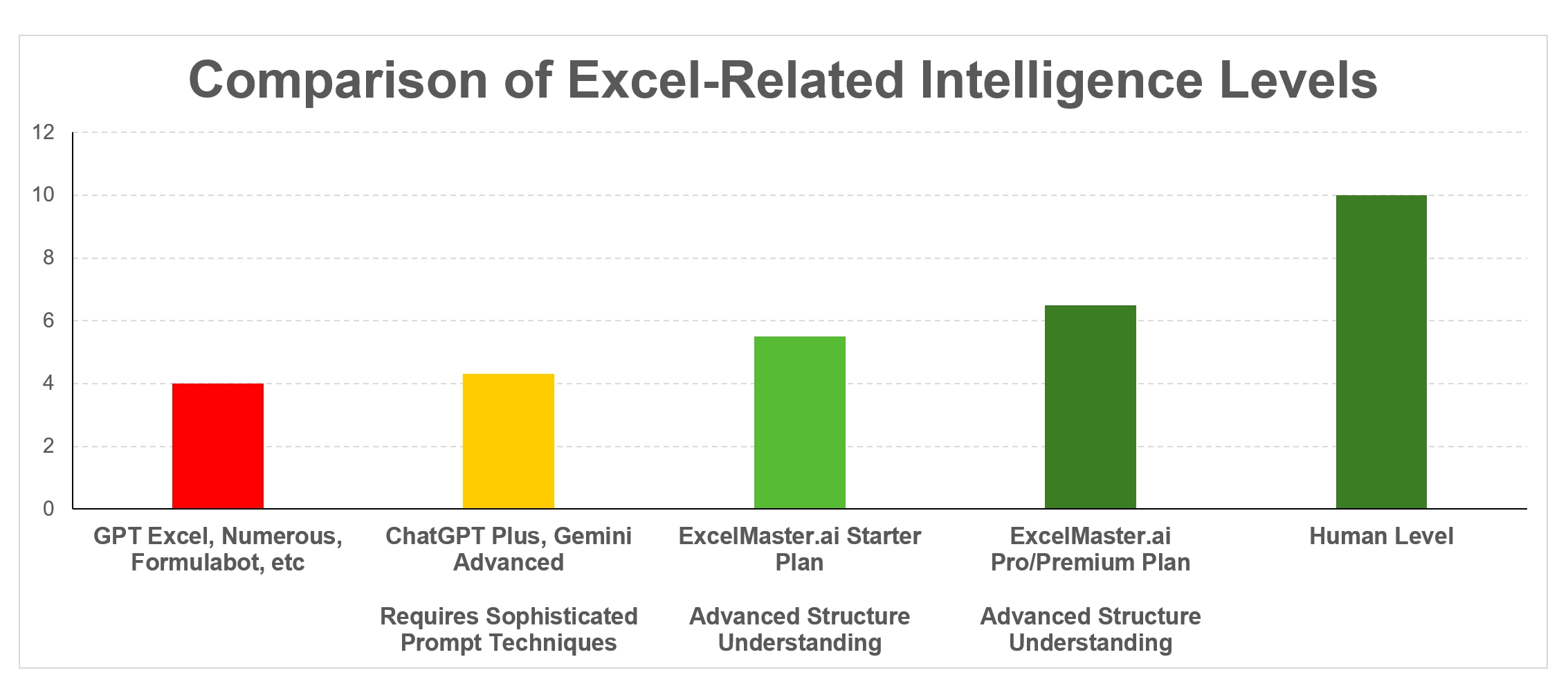
Not an Assistant. An Executor.
ExcelMaster doesn't just suggest — it reads your data, writes code, runs it, verifies the output, and retries if something goes wrong. Fully autonomous.
Real-Time Execution
Describe what you need in plain language. ExcelMaster writes VBA or Python, executes it directly in your workbook, and you watch the results appear cell by cell.
Full Transparency
Every action the agent takes is visible. You see the code it writes, the cells it modifies, and the reasoning behind each step — in a sidebar right next to your spreadsheet.
Built-in Safety & Audit Trail
Every operation starts with an automatic backup. If the agent makes an error, it rolls back and retries. You can restore to any checkpoint, and every change is logged for full auditability.
One Prompt. Real Results.
From financial modeling to data cleanup, ExcelMaster handles complex multi-step tasks that would take hours manually.
From Raw Data to Full Model
Creates the revenue forecast, calculates WACC, builds the DCF table with terminal value, adds sensitivity analysis — all formula-driven and dynamically linked. Change one assumption, every cell updates.
10,000 Rows, One Command
Scans your dataset, normalizes inconsistent formats, deduplicates intelligently, and applies conditional formatting to highlight issues.
Board-Ready Reports in Minutes
Aggregates data from transaction sheets, builds structured P&L rows, adds subtotals, applies professional formatting, and creates comparison charts.
Complex VBA, Zero Debugging
Generates production-quality VBA that loops through sheets, maps columns dynamically, handles edge cases, and runs immediately — no manual editing needed.
ExcelMaster saved me 3 hours of manual formatting every week. I just describe what I need, and it does everything inside my spreadsheet.
I was skeptical about AI in Excel, but ExcelMaster actually executes the code. No more copy-pasting formulas from ChatGPT.
The auto-backup feature gives me confidence to let the AI work on important spreadsheets. One-click restore is a lifesaver.
Three Steps to Automation
Install the Add-in
Download and run the installer. ExcelMaster appears as a tab in your Excel ribbon. No configuration needed.
Describe Your Task
Open any workbook and click ExcelMaster. Type what you need in the chat sidebar — in your own words.
Watch It Execute
The agent analyzes your data, writes code, runs it, and delivers results. You see everything happen live.
Starter
3-day free trial included
$9.99
/ MONTH
- Credit System
600 agent credits per month
Credits are consumed based on actual AI usage. Unused credits do not roll over.
All AI models included
GPT 5.4, Claude Sonnet 4.6, Claude Opus 4.6, ExcelMaster Operator and more
- AI Agent Capabilities
Multi-sheet structure understanding
VBA code generation & execution
Data analysis & transformation
Auto-backup & rollback
- Excel Support
Works with .xlsx / .xlsm files
Pro
3-day free trial included
$29.99
/ MONTH
- Credit System
1,800 agent credits per month
Credits are consumed based on actual AI usage. Unused credits do not roll over.
All AI models included
GPT 5.4, Claude Sonnet 4.6, Claude Opus 4.6, ExcelMaster Operator and more
- AI Agent Capabilities
Multi-sheet structure understanding
VBA code generation & execution
Python automation in Excel
Data analysis & transformation
Auto-backup & rollback
Complex multi-step workflows
- Excel Support
Works with .xlsx / .xlsm files
Premium
For power users and teams
$79.99
/ MONTH
- Credit System
4,800 agent credits per month
Credits are consumed based on actual AI usage. Unused credits do not roll over.
All AI models included
GPT 5.4, Claude Sonnet 4.6, Claude Opus 4.6, ExcelMaster Operator and more
- AI Agent Capabilities
Multi-sheet structure understanding
VBA code generation & execution
Python automation in Excel
Data analysis & transformation
Auto-backup & rollback
Complex multi-step workflows
- Excel Support
Works with .xlsx / .xlsm files
Priority support
Common Questions
ChatGPT and Claude give you formulas or code snippets that you need to manually copy, paste, and debug. Copilot can make edits but cannot run VBA or Python. ExcelMaster does the full loop: it reads your data, writes code, executes it inside your Excel, verifies the result, and fixes errors automatically.
ExcelMaster runs as a local add-in on your machine. Your raw spreadsheet files are never uploaded. When the agent needs to analyze your data, only the relevant cell content is sent to the AI model for processing — your full files stay on your machine. All API communication is encrypted in transit.
ExcelMaster supports Microsoft Excel 2016 and later on Windows 10/11. It requires the desktop version of Excel (not the web version).
ExcelMaster automatically creates a backup before every operation. If anything goes wrong, it can roll back to the exact state before the change. You can also manually restore to any previous checkpoint at any time.
ExcelMaster understands natural language prompts in English and other major languages. You can describe tasks in whichever language you are comfortable with.
No. ExcelMaster generates and executes code automatically. You just describe what you want in plain language. However, if you do know VBA or Python, you can review and modify the generated code before execution.